

The world of CNC machining is built on precision, efficiency, and seamless integration between hardware and software. Whether you’re a hobbyist or a professional, optimizing your setup can make all the difference in achieving flawless cuts, accurate measurements, and smooth machine control. In this comprehensive guide, we’ll explore four key elements that can elevate your CNC experience: the PoKeys57CNC interface, Mach4 probing capabilities, the role of a Mach 4 motion controller, and a step-by-step PoKeys tutorial to tie everything together.
Each of these components plays a vital role in modern CNC operations. The PoKeys57CNC device serves as a versatile interface, bridging the gap between your computer and machine. Mach4 probing enhances accuracy by allowing automated tool measurement and workpiece alignment, while a Mach 4 motion controller ensures smooth and responsive machine movements. Finally, a detailed PoKeys tutorial will walk you through setup and configuration, ensuring you get the most out of your system.
By the end of this article, you’ll have a deeper understanding of how these technologies work together to create a more efficient and precise CNC workflow. Whether you’re upgrading your current setup or starting from scratch, this guide will provide the insights you need to harness the full potential of your machining tools. Let’s dive in!
What Is PoKeys57CNC and How Does It Enhance CNC Machining?
When it comes to CNC machining, having a reliable interface between your computer and machine is crucial for smooth operation. This is where the PoKeys57CNC comes into play—a versatile and powerful device designed to simplify CNC control while offering advanced functionality. But what exactly is the PoKeys57CNC, and how does it improve your machining workflow?
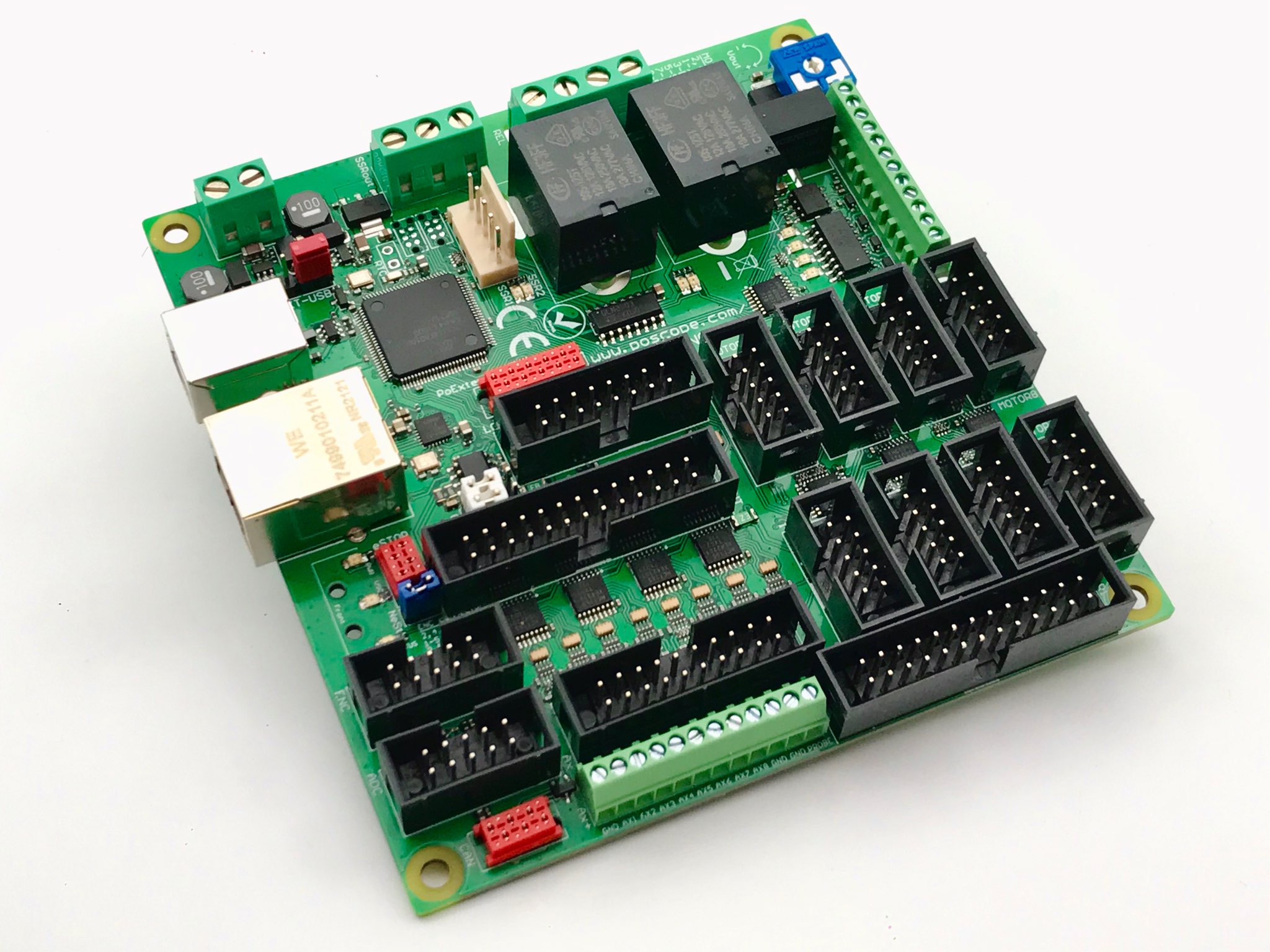
The PoKeys57CNC is a multifunctional USB interface board that acts as a bridge between Mach4 (or other CNC software) and your CNC machine’s hardware. Unlike generic input/output (I/O) boards, the PoKeys57CNC is specifically optimized for CNC applications, providing features like encoder input, PWM signal generation, and digital I/O expansion. One of its standout advantages is its ability to offload some processing tasks from the main computer, reducing latency and improving overall system responsiveness.
A key benefit of the PoKeys57CNC is its seamless integration with Mach4, one of the most widely used CNC control software platforms. By connecting the PoKeys57CNC to your system, you gain access to enhanced motion control, customizable macros, and real-time feedback—features that are essential for precision machining. Additionally, the board supports multiple encoder inputs, making it ideal for systems requiring high-resolution feedback, such as lathes or milling machines with closed-loop control.
Another advantage of the PoKeys57CNC is its flexibility. Whether you’re retrofitting an older machine or building a custom CNC setup, this device can be configured to meet various requirements. Its programmable logic allows users to create custom functions, such as automatic tool changes or spindle speed control, without needing additional hardware. This adaptability makes the PoKeys57CNC a popular choice among both hobbyists and professionals looking for a cost-effective yet powerful CNC interface solution.
In summary, the PoKeys57CNC enhances CNC machining by providing a robust, high-performance interface that improves communication between software and hardware. Its ability to handle complex tasks, support multiple inputs, and integrate smoothly with Mach4 makes it an invaluable tool for anyone seeking precision and efficiency in their CNC operations. Whether you’re running a small workshop or a high-production facility, the PoKeys57CNC can help streamline your workflow and unlock new capabilities in your machining projects.
Understanding Stepper Motor Drivers and Their Applications
How Does Mach4 Probing Improve CNC Accuracy and Workflow?
Precision is the cornerstone of CNC machining, and even the slightest measurement error can lead to costly mistakes. This is where Mach4 probing becomes an indispensable tool, automating the process of tool and workpiece measurement to ensure consistent accuracy. But how exactly does Mach4 probing work, and what benefits does it bring to CNC operations?
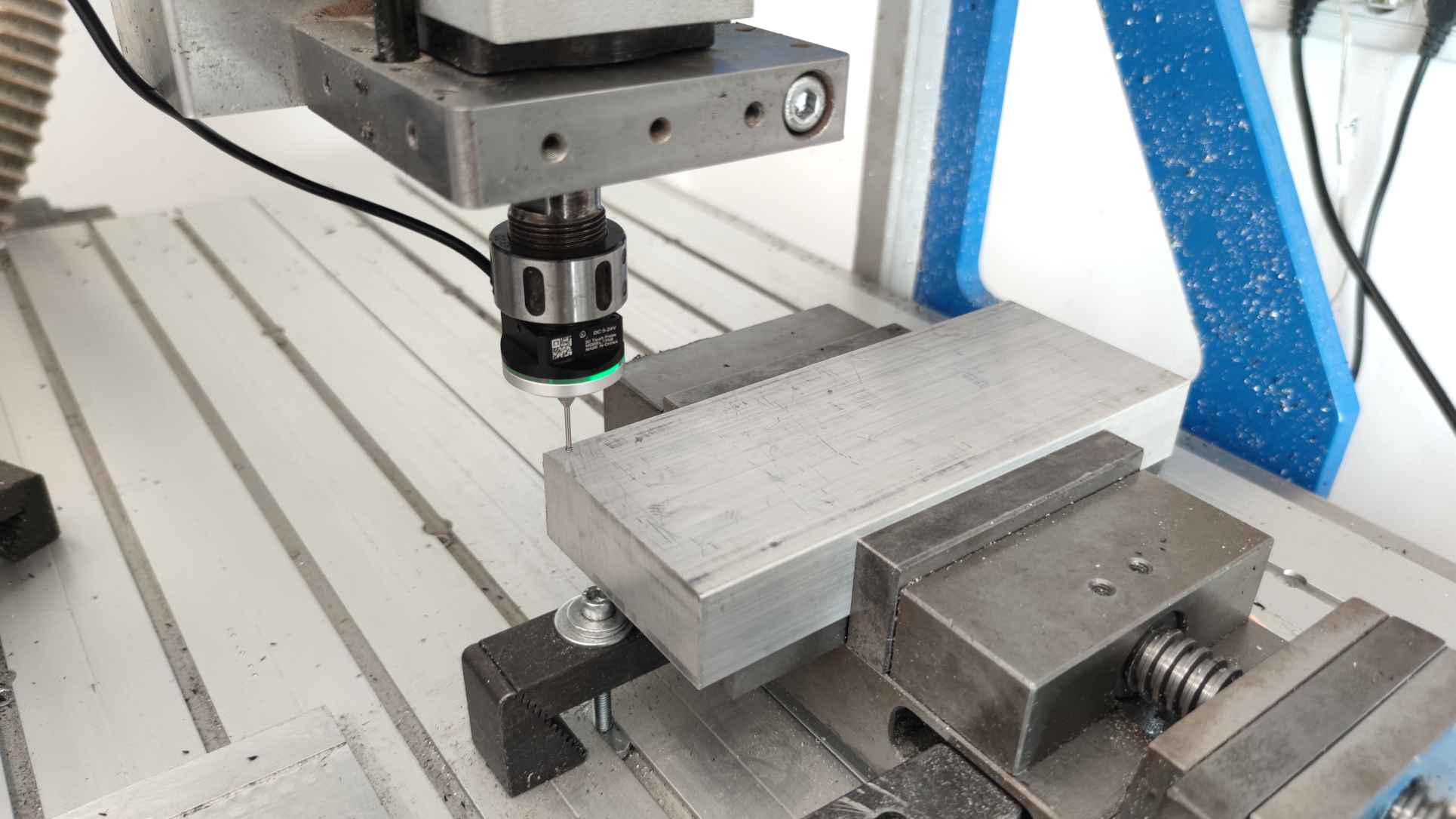
Mach4 probing refers to the use of a touch probe—a sensor-equipped device that detects physical contact with a workpiece or tool—to gather precise dimensional data. When integrated with Mach4, the probing system can automatically measure tool lengths, workpiece edges, and even complex geometries, eliminating the need for manual calibration. This not only saves time but also reduces human error, ensuring repeatable accuracy across multiple production runs.
One of the most significant advantages of Mach4 probing is its ability to automate tool length and diameter compensation. Before machining begins, the probe can quickly measure each tool in the spindle, updating the CNC controller with exact dimensions. This feature is especially useful in jobs requiring multiple tool changes, as it prevents misalignment issues that could otherwise ruin a workpiece. Additionally, Mach4 probing can detect tool wear by comparing expected and actual measurements, alerting the operator before defects occur.
Workpiece alignment is another area where Mach4 probing excels. Instead of manually edge-finding or using dial indicators, the probe can automatically locate part zero, edges, and even bore centers with micron-level precision. This is particularly beneficial for complex setups, such as multi-sided machining or fixtures with irregular geometries. By automating these tasks, Mach4 probing significantly reduces setup time while improving consistency.
Beyond basic measurements, Mach4 probing can also perform in-process inspections. For example, mid-machining probe checks can verify critical dimensions, allowing for real-time adjustments if deviations are detected. This capability is invaluable for high-tolerance industries like aerospace or medical manufacturing, where even minor errors can lead to part rejection.
In conclusion, Mach4 probing transforms CNC machining by replacing manual measurement with automated, high-precision detection. Its ability to streamline tool setup, enhance workpiece alignment, and enable in-process verification makes it a game-changer for both small shops and large-scale production environments. By integrating Mach4 probing into your workflow, you can achieve higher accuracy, faster setups, and greater confidence in every cut.
Why is a Mach 4 Motion Controller Essential for High-Performance CNC Systems?
At the heart of every smooth-running CNC machine lies a critical component: the Mach 4 motion controller. This device serves as the brain of the operation, translating digital commands from the software into precise physical movements of the machine. But what makes a Mach 4 motion controller so vital, and how does it impact performance in demanding CNC applications?
A Mach 4 motion controller is responsible for coordinating the complex interplay of motors, drives, and sensors that bring CNC machining to life. Unlike basic pulse generators, a dedicated motion controller optimizes trajectory planning, acceleration profiles, and error correction in real time. This ensures that multi-axis movements remain synchronized even at high speeds, preventing the stuttering or positional drift that can ruin precision work. The result? Smother cuts, tighter tolerances, and the ability to tackle intricate 3D contours with confidence.
One of the standout advantages of a Mach 4 motion controller is its ability to handle high-frequency pulse streams without overburdening the host computer. By offloading motion calculations to specialized hardware, the controller maintains consistent performance even when running complex toolpaths or rapid directional changes. This is especially critical for modern CNC applications, where increasing demands for speed and precision push older control methods to their limits. Whether you’re routing delicate aerospace components or carving detailed molds, a robust Mach 4 motion controller ensures your machine responds instantly to every command.
Advanced features like look-ahead functionality further elevate the capabilities of a Mach 4 motion controller. By analyzing upcoming movements in the G-code, the controller can dynamically adjust feed rates and axis coordination to avoid sudden stops or jerks that cause tool marks or mechanical stress. This not only improves surface finish but also extends the lifespan of your machine components. Additionally, closed-loop feedback systems—supported by many high-end motion controllers—provide real-time error correction, compensating for mechanical backlash or missed steps to maintain absolute accuracy.
Integration flexibility is another hallmark of a quality Mach 4 motion controller. Whether you’re retrofitting a legacy machine or building a custom CNC setup, these controllers often support a wide range of drives (stepper, servo, or hybrid) and feedback devices (encoders, linear scales). This adaptability makes them indispensable for users who demand both performance and future-proofing in their systems.
Ultimately, a Mach 4 motion controller isn’t just another component—it’s the cornerstone of CNC reliability and precision. By ensuring flawless execution of every movement, it empowers machinists to push the boundaries of speed and complexity without sacrificing accuracy. For anyone serious about CNC performance, investing in a capable motion controller isn’t an option; it’s a necessity.
How Can a PoKeys Tutorial Help You Master Your CNC Setup?
Setting up a CNC system involves multiple components working in harmony, and the PoKeys57CNC interface plays a pivotal role in bridging software and hardware. However, unlocking its full potential requires proper configuration—which is where a well-structured PoKeys tutorial becomes invaluable. But what exactly can you learn from such a tutorial, and how does it simplify the process of optimizing your CNC machine?
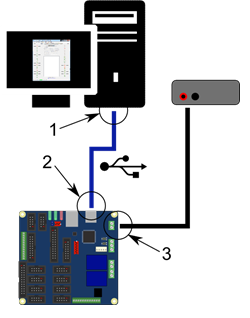
A comprehensive PoKeys tutorial typically begins with hardware installation, guiding users through the physical connection of the PoKeys57CNC board to both the computer and the CNC machine’s electronics. This step is crucial, as incorrect wiring can lead to communication failures or erratic machine behavior. The tutorial explains how to identify and connect essential pins for inputs (like limit switches and probes) and outputs (such as spindle control and coolant relays), ensuring a solid foundation before moving to software setup.
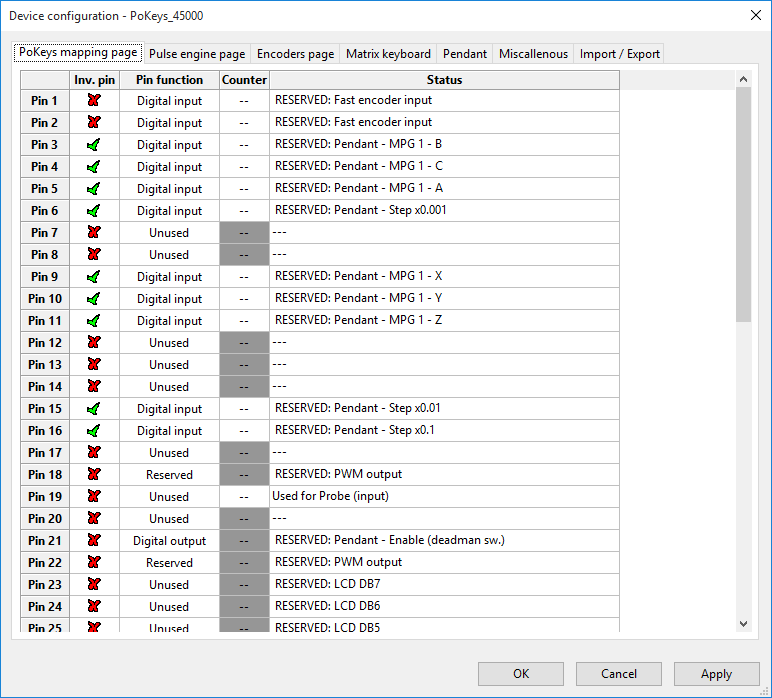
Next, a PoKeys tutorial dives into software configuration within Mach4, demonstrating how to establish communication between the PoKeys57CNC and the CNC control software. This includes installing necessary plugins, assigning functions to specific I/O pins, and calibrating encoder inputs for accurate feedback. For beginners, this stage can be daunting, but a detailed tutorial breaks it into manageable steps—preventing common pitfalls like misconfigured axis homing or unresponsive peripherals.
One of the most powerful aspects covered in a PoKeys tutorial is macro programming. The PoKeys57CNC supports custom scripts that automate repetitive tasks, such as tool changes or probing routines. A tutorial walks users through creating and testing these macros, turning complex sequences into one-touch operations. This not only saves time but also reduces manual errors during machining.
Troubleshooting is another critical area addressed in a PoKeys tutorial. Even with careful setup, issues like signal noise or unresponsive inputs can arise. The tutorial provides diagnostic techniques—such as using the PoKeys diagnostic tool to monitor signal integrity or testing individual pins—to quickly isolate and resolve problems. This knowledge is especially valuable for users maintaining or upgrading their systems over time.
By the end of a PoKeys tutorial, users gain not just a functional setup, but the confidence to customize and expand their CNC capabilities. Whether automating workflows with advanced macros or integrating additional sensors, the skills learned translate directly into improved efficiency and precision. For both novices and experienced machinists, a PoKeys tutorial is the key to transforming a basic CNC machine into a finely tuned, high-performance system.
In essence, a PoKeys tutorial demystifies the setup process, turning technical complexity into actionable steps. It’s the fastest way to harness the full potential of your PoKeys57CNC—and by extension, your entire CNC workflow.
Where Physical Meets Digital: The Evolution of Precision Control Systems
Relays, Timing & Beyond: Building Blocks for Arduino and Industrial Automation
Elevating Your CNC Performance with PoKeys and Mach4
The journey through CNC optimization reveals how critical each component is in achieving precision, efficiency, and reliability. From the versatile PoKeys57CNC interface to the game-changing Mach4 probing system, and from the indispensable Mach 4 motion controller to the step-by-step guidance of a PoKeys tutorial, each element plays a vital role in transforming your machining workflow.
The PoKeys57CNC stands out as a powerful bridge between software commands and hardware execution, offering flexibility and advanced features like custom macros and encoder support. Its seamless integration with Mach4 ensures smoother operations, whether you’re running a hobbyist workshop or a professional production line. Meanwhile, Mach4 probing revolutionizes accuracy by automating measurements, reducing setup time, and eliminating human error—key advantages for high-tolerance projects.
A robust Mach 4 motion controller serves as the backbone of your CNC system, ensuring flawless coordination of movements even in complex, high-speed operations. Its ability to manage real-time adjustments and error correction makes it indispensable for demanding applications. And with a detailed PoKeys tutorial, even beginners can confidently configure and troubleshoot their setups, unlocking the full potential of their hardware and software.
Together, these technologies create a synergy that elevates CNC machining to new levels of precision and productivity. Whether you’re refining an existing machine or building a new one from scratch, integrating these tools will help you achieve consistent, professional-grade results. The key lies in understanding their roles and leveraging their capabilities—something this guide has aimed to demystify.
As CNC technology continues to evolve, staying informed and adaptable will ensure your machining processes remain competitive. By mastering the PoKeys57CNC, harnessing Mach4 probing, optimizing with a Mach 4 motion controller, and following a clear PoKeys tutorial, you’re not just keeping up with the industry—you’re setting the standard for excellence. Now, it’s time to put this knowledge into action and experience the difference firsthand. Happy machining!